



The Ultimate Guide to Computer-Related Elbow Pain: Prevent, Set Up, Treat & Rehabilitate
A clinician-informed, evidence-backed practical guide for desk workers, gamers, clinicians, and ergonomics teams.
What is computer-related elbow pain?
"Computer-related elbow pain" is a colloquial umbrella term describing elbow and forearm pain that arises from repeated, prolonged desk work — commonly from extensive mouse use, prolonged typing, or sustained awkward wrist/forearm postures. The most familiar clinical diagnoses behind this symptom cluster include lateral epicondylitis (tennis elbow), medial epicondylitis (golfer's elbow), radial tunnel syndrome, and cubital tunnel syndrome. Each has its own mechanism and pattern of symptoms; together they explain the majority of "computer elbow" complaints.

Clinically, lateral epicondylitis involves degeneration or microtearing of the wrist-extensor tendons at the lateral epicondyle and is commonly linked with repetitive gripping and wrist extension tasks.
Types of elbow pain encountered at the desk (quick differential)
Lateral epicondylitis (Tennis elbow)
Pain on the outer (lateral) side of the elbow, worse with gripping, wrist extension, or lifting small objects. Often tenderness directly over the lateral epicondyle. May be caused by repetitive clicks, gripping a low-sensitivity mouse, or constant wrist extension against resistance.
Medial epicondylitis (Golfer's elbow)
Pain on the inner (medial) side of the elbow — typically associated with repetitive wrist flexion and pronation. Can occur with repetitive typing or sustained forearm pronation under load.
Ulnar nerve entrapment (Cubital tunnel)
Numbness/tingling in the ring and little fingers, sometimes pain on the inner elbow. Symptoms that wake you at night or happen with sustained elbow flexion require clinical assessment. Non-surgical strategies can work, but progressive weakness or muscle wasting are red flags.
Radial tunnel syndrome
Deep aching pain on the top of the forearm, often without obvious elbow tenderness. Caused by compression of the radial nerve and can be mistaken for lateral epicondylitis.
Note: many desk-related elbow problems are mixed or overlap (e.g., tendon overload + mild nerve irritation). Accurate diagnosis guides treatment, so persistent or worsening symptoms should be evaluated.
How prolonged computer use causes elbow pain — biomechanical and physiological mechanisms
The body is exquisitely sensitive to repeated micro-loads. Even low-force actions — like repeated mouse clicks, sustained small-force gripping, or subtle wrist extension while pointing — can cumulatively overload tendons, create microtears, provoke inflammatory signaling, and generate pain. Recent laboratory work shows that sustained low-force repetitive clicking induces measurable forearm fatigue and changes in distal motor performance — mechanisms highly relevant to gamers and heavy pointer users.

Key mechanisms explained
- Load concentration: Placing the wrist and hand in positions that bias the wrist-extensor muscles (e.g., wrist extension, radial deviation) increases load on the extensor carpi radialis brevis tendon that attaches at the lateral elbow.
- Repetition + insufficient recovery: Tendons adapt slowly. Repetitive low-grade loading without adequate recovery time leads to tendon degeneration (tendinosis), not just short-lived inflammation.
- Poor leverage & grip force: Extended reaches, low pointer sensitivity, and small precision grips increase grip force and wrist extensor demand — every extra gram of force multiplies tendon strain over thousands of repetitions.
- Nerve irritation from posture: Chronic elbow flexion or pressure can irritate the ulnar nerve (cubital tunnel), while repetitive pronation/supination can affect radial nerve pathways — producing numbness, tingling, or diffuse forearm pain.

In short: it's not a single big lift — it's thousands of small mechanical insults combined with inadequate ergonomic support and recovery.
Risk factors & prevalence — who gets computer-related elbow pain?
Epidemiological and workplace studies consistently identify several modifiable and non-modifiable risk factors:
| Category | Risk factors |
|---|---|
| Workload | High daily hours on mouse/keyboard (>4–6 hours), high click rates, prolonged static postures |
| Posture & setup | Elbows held far from the body, unsupported forearms, too-low/high surfaces, poor chair support |
| Tools | Low sensitivity mouse (causes larger movements), keyboard requiring extended reach, lack of forearm rests |
| Individual | Age, smoking, previous tendon injury, poor conditioning |

Recent cross-sectional data in healthcare workers and computer users identifies measurable prevalence of lateral epicondylitis (a component of computer-related elbow pain) and correlates it with computer use patterns and personal factors.
Practical takeaway: reduce cumulative exposure (time × intensity × poor posture) and address the tools and workstation to lower individual risk.
Evidence-backed ergonomic desk setup — step-by-step (with target numbers)
Good ergonomics dramatically reduces tendon load by optimizing leverage and reducing unnecessary muscle effort. OSHA guidance offers clear positional targets for keyboard and pointer work: keep your elbows near the body, bent between approximately 90° and 120°, with forearms roughly parallel to the floor and wrists neutral. These practical targets are evidence-friendly, simple to check, and a great starting point.
Step 1 — Chair & body alignment
- Adjust seat height so your feet are flat and thighs roughly parallel to the floor.
- Sit back so your lumbar curve is supported; don’t perch at the edge of the chair.
- Relax shoulders; let your upper arms hang close to the trunk.
Step 2 — Elbow & arm geometry (numeric targets)
- Elbow angle: Aim for 90°–110° of elbow flexion during typing and mouse work.
- Forearm position: Forearms should be near parallel to the floor or slightly declined (0–10° downward). Avoid sustained elevation of the forearm.
- Distance: Bring the keyboard and mouse close enough that your elbows stay tucked; hands should not be forced forward.
Step 3 — Keyboard & mouse placement
- Place the keyboard directly in front of you; use negative tilt (slight downward) if wrists tend to dorsiflex.
- Position the mouse at the same level as the keyboard and as close as possible to minimize reach.
- Consider raising pointer sensitivity (DPI) so the physical travel distance is reduced — this lowers cumulative movement and fatigue.
Tip — Forearm support
Use a soft forearm rest close to the keyboard area while idle, but avoid constant pressure during movement. Support only during rest periods to reduce static loading on extensors.
Tip — Microbreaks and timers
Short microbreaks every 20–30 minutes and a longer 5–10 minute break every 60–90 minutes reduce cumulative load and improve recovery.
Step 4 — Monitor & visual focus
Center the monitor, with top of screen at or just below eye level, and at an arm's length away. If you constantly lean forward, you increase shoulder and arm stress — fix visual ergonomics first to avoid compensatory postures.

Quick checklist — workstation setup
- Adjust chair height so feet are flat, knees ~90°
- Keep elbows 90°-110°, tucked near body
- Forearms parallel to desk, wrists neutral
- Keyboard in front, negative tilt if needed
- Mouse at same level, close to keyboard, high sensitivity
- Soft forearm support only when resting
- Take microbreaks every 20-30 minutes
- Perform daily stretches & eccentric exercises (8-week program)
- Monitor for numbness, tingling, or persistent pain
- Consult clinician if symptoms worsen or persist beyond 6 weeks
OSHA's eTool for computer workstations provides practical visuals and position definitions to help verify these targets.
Ergonomic Setup Demonstration — Desk & Arm Support
A certified physical therapist explains how correct ergonomic setup (including forearm and arm support) reduces long-term strain.
Elbow Rest for Desk Edge — Why Proper Forearm Support Changes Everything
One of the most overlooked contributors to computer-related elbow pain is unsupported forearms during prolonged typing and mouse use. When the forearm hangs in mid-air or presses directly against a hard desk edge, it increases static muscle load, compressive stress at the elbow joint, and cumulative tendon strain.
How Desk Edge Pressure Contributes to Pain
- Increased static load on wrist extensors (linked to lateral epicondylitis)
- Direct compression of soft tissue at the cubital tunnel
- Restricted micro-movement, increasing tendon microtrauma
- Higher shoulder tension due to lack of forearm support
- Reduced circulation contributing to inflammation and fatigue
Visual Guide: Preventing Mouse & Elbow Pain
Expert tips on ergonomic adjustments to reduce elbow and arm strain during computer use.
Key Benefits of a Desk Edge Elbow Rest
Supports forearm weight so muscles don’t stay contracted for hours.
Less strain on wrist extensors and flexors during typing and mouse work.
Soft surface reduces compression compared to hard desk edges.
Helps maintain natural elbow angle (90–110° flexion) and reduces cubital tunnel pressure.
Who Benefits Most?
- Remote workers typing 4+ hours daily
- Designers & developers using mouse-intensive workflows
- Gamers with extended continuous sessions
- Individuals recovering from mild tennis elbow symptoms
Recommended Solution — L-Shaped Desk Edge Elbow Support
While wrist rests alone only support the wrist, they leave the forearm and elbow exposed to desk-edge pressure. An L-shaped ergonomic support that spans the desk edge cushions both the wrist and elbow, helping distribute pressure evenly and maintain neutral arm posture. This reduces cumulative stress during typing and mouse work, protects soft tissues, and promotes long-term elbow health.
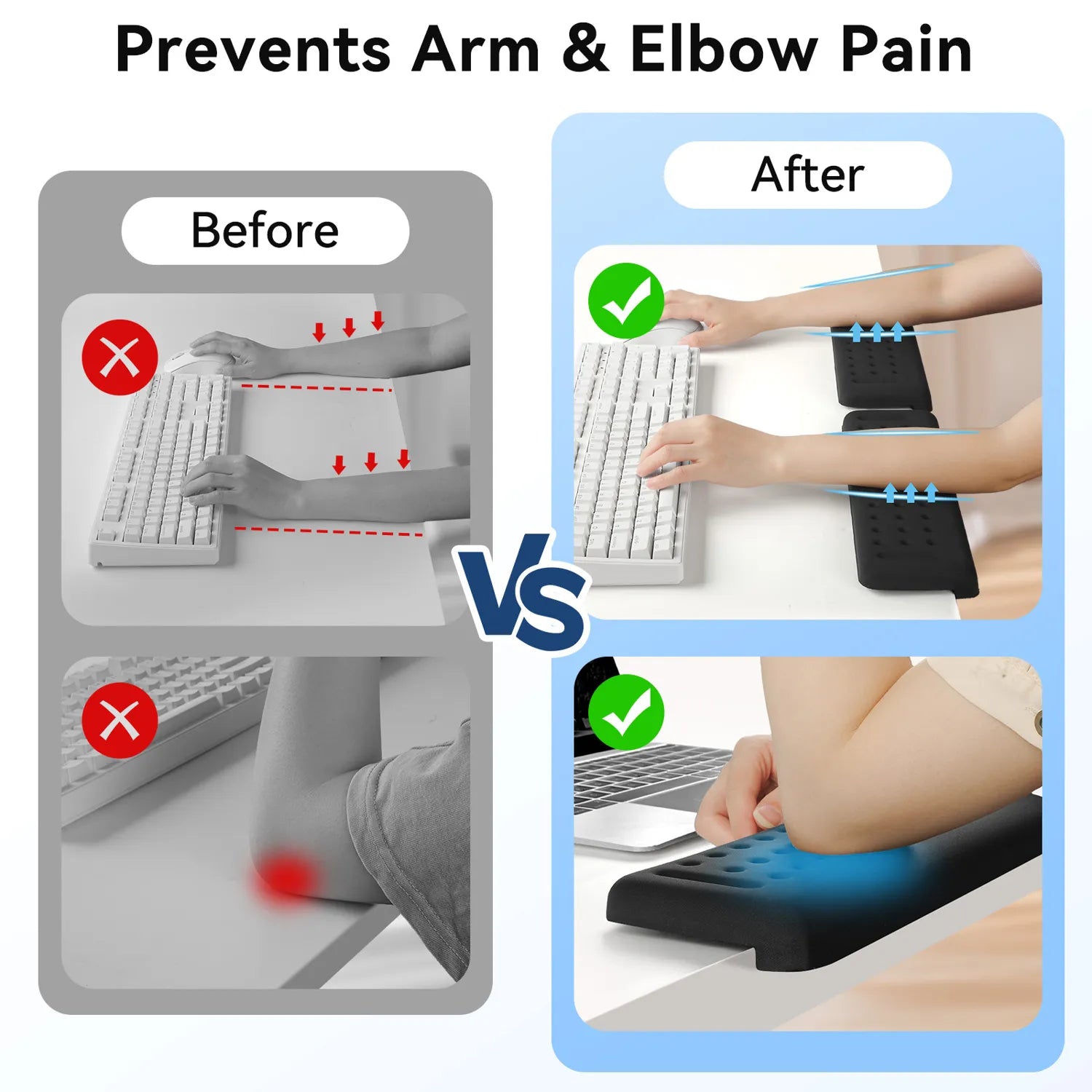
Memory Foam L-Shaped Wrist & Elbow Support for Desk Edge
Ergonomic L-shaped desk edge support to protect your forearms and elbows during prolonged computer work. Reduces pressure on tendons and nerves while maintaining neutral alignment of wrist and forearm.
- Memory foam cushioning distributes pressure evenly across forearm and elbow
- L-shaped design fits most desk edges, preventing elbow irritation
- Two-piece setup for customizable placement
- Non-slip base keeps supports in place during typing or mouse use
- Promotes neutral wrist and forearm posture to reduce fatigue
Using an ergonomic elbow rest for the desk edge complements a proper workstation setup: it protects soft tissues from contact stress, supports neutral forearm alignment, and can help reduce symptoms associated with computer-related elbow strain. Combined with microbreaks, posture adjustments, and targeted exercises, it maximizes arm comfort and may prevent chronic elbow pain.
Immediate relief & first-line self care (what to do today)
If you notice early pain or discomfort, early action prevents progression. Use a layered approach: activity modification, short-term symptomatic care, and setup changes.
Activity modification
- Reduce continuous mouse time — use keyboard shortcuts and trackpad gestures to vary movement.
- Increase pointer sensitivity to lower physical travel per task.
- Alternate hands where practical (e.g., switch pointer to left hand for short periods) — only if safe and comfortable.
Symptom control (short term)
- Rest: Short periods of reduced load for the first 48–72 hours if pain is acute.
- Ice: Apply for 10–15 minutes after heavy use if there is focal soreness (helps reduce acute inflammatory discomfort).
- Compression/brace: A counterforce brace below the lateral epicondyle can reduce tendon load during gripping tasks — useful as a temporary measure.
- Analgesics: OTC NSAIDs (ibuprofen/naproxen) can help symptom control if medically appropriate; consult your primary care clinician if unsure.
These are immediate steps, not definitive cures. If symptoms persist beyond 1–2 weeks despite sensible modifications, follow the rehabilitation plan below or see a clinician.
Progressive exercise & rehabilitation plan — a practical 8-week program
Exercise therapy is one of the best-supported conservative treatments for lateral epicondylitis and other repetitive tendinopathies. Randomized trials show structured exercise programs reduce pain and improve function relative to passive care.
Program principles
- Consistency: Short sessions, multiple times per day for mobility; strengthening 3–5x per week.
- Progression: Start with pain-free range, progress to isometric holds, then to eccentric strengthening, finally concentric and functional loading.
- Load management: Avoid sudden heavy gripping during flare phases.
Weeks 0–2: Mobility & neural gliding (foundation)
- Wrist extensor stretch: With elbow extended, pronate forearm, and gently flex wrist (hold 30s × 3, 3 times/day).
- Wrist flexor stretch: Opposite direction for medial pain (hold 30s × 3).
- Neural glides: Gentle ulnar/radial nerve gliding sequences if numbness/tingling present — perform slowly and pain-free.
Weeks 2–5: Isometrics → eccentric initiation
- Extensor isometrics: Press dorsum of hand gently against immovable surface (10s holds × 8 reps × 2 sessions/day).
- Eccentric wrist extension: Use light dumbbell (0.5–2 kg). Lift with unaffected hand; lower slowly with affected hand (3 sets × 15 reps every other day).
- Grip modulation: Rice bucket finger curls and controlled squeezing for motor retraining (light intensity).
Weeks 6–8: Strengthening & functional return
- Increase eccentric load gradually (add 0.5–1 kg every 1–2 weeks as tolerated).
- Introduce forearm pronation/supination resistive training and functional tasks (typing simulations, controlled mouse tasks with pauses).
- Begin sport-specific or job-specific return activities with graduated exposure.
Important: exercises may provoke mild discomfort, but sharp or worsening pain is a sign to reduce intensity. If your symptoms are not improving after 6–8 weeks of consistent exercise and workload adjustments, consult a physical therapist or clinician for a tailored program.
Sample daily routine (10–20 minutes)
- AM: Wrist extensor stretch (3 × 30s) + extensor isometrics (8 × 10s)
- Midday: Neural glides (if indicated) + light grip work (3 × 20s)
- PM: Eccentric lowering (3 × 15) or resistance curls as tolerated
Clinical trials and systematic reviews show exercise regimens involving eccentric and progressive loading provide meaningful pain reduction and functional improvement in many patients with lateral epicondylitis.
Ergonomic tools that reduce elbow stress — what works and why
Tools are not a silver bullet, but the right devices reduce mechanical demands and cumulative movement. Below are evidence-informed categories and practical guidance.
Vertical / neutral grip mice
These reduce wrist pronation and the need for sustained wrist extension, lowering strain on wrist extensors during pointing tasks. Useful for users with persistent lateral forearm pain.
High-DPI / adjustable sensitivity mice
Increasing pointer sensitivity reduces physical travel distance and repetitive reach. Studies of mouse fatigue show lower travel distance reduces distal motor fatigue during prolonged clicking.
Ergonomic keyboards & negative tilt trays
Split keyboards and negative tilt can keep wrists more neutral and prevent wrist extension that transfers strain to elbow extensors.
Forearm supports and desk pads
Soft forearm supports reduce static load during idle periods; avoid pressing on them when actively mousing to prevent compression of soft tissues.
Choose devices that fit your hand size and work tasks. Testing devices in short trials before full adoption is a practical approach — small changes in shape and angle produce large differences in comfort.
Work modifications, scheduling & digital helpers to lower cumulative load
Microbreak strategy
Regular microbreaks (20–30 seconds) every 20–30 minutes with a longer break (5–10 minutes) every hour to 90 minutes significantly reduce fatigue and mental strain. Use task-based alternation; alternate mousing with keyboard-intensive tasks where possible.
Digital tools
- Use break timers (e.g., Pomodoro apps) configured for 25/5 or 50/10 intervals depending on workflow.
- Macro/shortcut utilities (e.g., AutoHotkey, native OS shortcuts) to reduce repetitive pointer actions.
- Pointer acceleration settings tuned to personal preference — faster movement reduces physical distance traveled.
Work design
Encourage task rotation in teams to reduce repetitive exposure. For jobs that require continuous fine motor control, schedule short alternating duties that engage larger muscle groups.
When to see a clinician — red flags, tests & likely care pathways
Most computer-related elbow pain improves with conservative care. However, certain features require prompt evaluation:
- Severe or rapidly worsening pain, especially after a specific injury.
- Persistent numbness or tingling in the ring/little fingers (possible ulnar nerve/ cubital tunnel involvement) or finger weakness.
- Failure to improve after 6–12 weeks of active self-management and graded exercise.
- Signs of infection (fever, redness, warmth) or systemic illness.
Standard clinical assessment usually includes focused physical exam maneuvers (resisted wrist extension for lateral epicondylitis; Tinel's sign and elbow flexion test for ulnar nerve entrapment), and may include imaging or nerve conduction studies if needed. Conservative measures (PT, bracing, activity modification) are the first line; invasive options (corticosteroid injection, PRP, surgery) are reserved for refractory cases.
If you have numbness and progressive weakness, seek assessment promptly — nerve compression can lead to permanent deficits if untreated.
Realistic case examples & troubleshooting
Case A — The product manager with early lateral forearm pain
Situation: 35-year-old who does long stretches of fine mouse work and notices outer elbow soreness after long sprints. Intervention included increasing mouse DPI, moving mouse closer, a 6-week eccentric exercise program, and scheduled microbreaks. Outcome: marked symptom reduction within 6 weeks and full return to typical workload within 12 weeks.
Case B — The customer support agent with numbness
Situation: 42-year-old with inner elbow pain and numbness in ring/little fingers after overnight work shifts with elbows bent while sleeping. Intervention: activity modification (reduce elbow flexion while sleeping with an elbow splint), ergonomic workstation corrections, and nerve gliding exercises. Outcome: resolution of nocturnal paresthesias and improved daytime comfort after 4–8 weeks; referred for EMG only when weakness persisted.
Troubleshooting principle: change one variable at a time and allow sustained observation (1–2 weeks) — this isolates effective interventions.
FAQs
Q: Is "computer elbow" the same as tennis elbow?
A: "Computer elbow" is a user term. The clinical correlate is often lateral epicondylitis (tennis elbow), but computer users can also present with medial epicondylitis, radial tunnel syndrome, or ulnar nerve irritation. The underlying mechanism is repetitive microtrauma and tendon overload rather than a single acute injury.
Q: How long does computer-related elbow pain take to get better?
A: Many cases improve within 6–12 weeks with active rehabilitation and ergonomic changes. Persistent or refractory cases may require longer therapy or further interventions. Exercise programs show benefit within weeks but require consistent adherence.
Q: Will a brace cure my elbow pain?
A: A counterforce brace can reduce load during gripping and is a useful adjunct, especially during flare or when immediate activity modification is difficult. It is rarely a standalone cure but helps symptom control while you implement ergonomic and exercise strategies.
Q: Are injections or surgery commonly needed?
A: Most people respond to non-surgical measures (exercise, ergonomic change, PT). Injections (corticosteroid or platelet-rich plasma) and surgical options are reserved for persistent, function-limiting cases not responding to conservative care. Clinical judgment and specialist evaluation guide these choices.
Q: How can I tell if it's a nerve problem?
A: Nerve issues (e.g., cubital tunnel) tend to cause numbness and tingling (especially ring and little finger) and can feature weakness. Tests like Tinel's at the elbow, elbow flexion test, or nerve conduction studies clarify the diagnosis. If you have persistent paresthesia or weakness, seek evaluation.
Q: Can changing to a vertical mouse help?
A: For many users, vertical or neutral grip mice reduce forearm pronation and wrist extension demand — these changes can lower strain on the extensor tendons and reduce symptoms for some users. Test changes in short trials and combine with other interventions for best effect.
References & Authoritative Resources
This guide cites authoritative clinical resources and peer-reviewed literature to support practical recommendations:
- Mayo Clinic — Tennis elbow (overview, symptoms & causes)
- OSHA – Computer Workstations: Hazards and Solutions – Workplace ergonomics guidance for safer computer workstation setup and injury prevention.
- Systematic review on resistance exercise effectiveness for lateral epicondylosis
- BMJ study comparing physiotherapy and treatment approaches for tennis elbow
- NHS – Tennis Elbow (Lateral Epicondylitis)
- Impact of repetitive mouse clicking on forearm muscle fatigue and mouse aiming performance
- NCBI Bookshelf — Lateral epicondylitis (tennis elbow) diagnosis and management
For clinicians: consult local practice guidelines and specialty society protocols when managing complex or refractory cases.
Prepared as a comprehensive, evidence-informed resource. This page summarizes clinical literature and workplace guidance; it does not replace individualized medical care.